
Walrus Audio Highpoint Compressor Review
The first thing you notice about the High Point is that it doesn’t feel like a “fix your signal” compressor. Putting this out there right up front, the Highpoint compressor will do that but also it is capable of so much more. Notably, its going to help you deal with inconsistent room acoustics, aggressive B strings on bass guitar, switching between finger style and pick with ease, and making the instrument pop out in a mix. It is versatile.

On the one hand there are many compressors that are so transparent they almost feel invisible. On the other, there are compressors that are so squashy and colored that that they become an inherent part of your sound, for better or worse. In the case of the Highpoint compressor pedal its as if Walrus went for producing a pedal set squarely in the middle.
The Walrus Highpoint is a musical, mix-focused compressor that tightens your playing without making your bass or guitar feel smaller or overly processed.
With finger style, it evens out inconsistencies without making your right hand feel disconnected from the amp. With a pick, it preserves the aggression and click instead of flattening the transient. On a 5-string bass, the B string stays controlled without that “blanket over the cab” effect some compressors create. With bass guitar what makes it interesting is how controlled the low end stays, how natural the attack remains, and how quickly the bass fits (and more importantly, sits) in the mix.
It's hard to make the Highpoint sound (or feel) bad.
Running internally at ±15VDC for high headroom, it uses an analog optical circuit that delivers the smooth, musical compression optical designs are known for, but with far more tweakability than most pedal compressors offer. You get a full range of control.

The Blend dial mixes dry and compressed signal for parallel compression. With the control all the way counter clockwise, all compressed signal is removed and only your unaffected signal is present. All the way clockwise is fully compressed with all dry signal removed. For me, a blend control is one of the most valuable features of a compressor because it allows you to dial in as much (or little) clarity as you want while benefitting from the value a great compressor offers. When you roll in some dry unaffected signal it can can help maintain that organic feel while allowing more dynamic nuance to get through. It also allows you to dial in more aggressive settings and then blend in a little more dry signal to keep things feeling natural. The Threshold dial controls the level at which compression will begin to activate. Lower knob positions will create a more “squashed” compression with more sustain. In other words, with a low threshold (the dial more counter clockwise) the lower the amount of signal is needed to trigger the compression circuit. Rotate clockwise for subtle leveling that keeps your natural dynamics more intact. Technical range: Off to -32dB. The Attack dial controls how quickly the compressor clamps down after the signal crosses the threshold. Being an optical compressor, the attack behavior has a naturally smooth, slightly rounded quality compared to VCA or FET designs. Rotating more clockwise has a slower attack meaning more of your initial transient will get through as the compressor takes more time to latch on. Even at its fastest setting, the Highpoint's attack won't be as brutally instant as something like an 1176-style FET compressor. It will still have a musical, organic quality to how it grabs the signal. Technical range: 8ms to 30ms. The Release dial controls how quickly the compressor lets go after your signal drops back below the threshold. Counterclockwise is a faster release. Rotating clockwise extends the release time for more sustain. Technical range: 50ms to 4s. The Ratio dial controls the amount of gain reduction applied (how hard it squeezes). The current iteration of the published manual says the technical range is 1:1 to 2.1:1, up to -30dB of reduction. I contacted Walrus to inquire about that being an error. 2.1:1 seems odd. After a bit of back-and-forth the team at Walrus told me they are planning to make an edit to the verbiage in the manual. Their proposed language is below.
"Ratio controls the maximum amount of gain reduction the compressor can apply. Unlike traditional compressors, this does not set a fixed ratio (like 4:1 or 10:1). Instead, it determines how strongly the signal is compressed overall.Turn it up for heavier compression and a more “squashed” feel, or turn it down for a lighter touch. At minimum, no compression is applied. What It Does Controls the overall amount of gain reduction the compressor can apply Technical Range From 0dB up to -20dB gain reduction* *note: Overall attenuation will occur when Ratio is above minimum even with position of the Threshold control at Max, up to ~5dB attenuation. How To Use: Turn the ratio knob up for tight, controlled, punchy tones with added sustain, or keep it low for transparent smoothing that feels more open. Knob at minimum = lower ratio Knob at maximum = higher ratio"
The Make-Up dial adds gain back after compression to match your bypassed level. The more aggressive compression you dial in, the more make-up gain you'll need to apply. Realize though that its a trade-off with the introduction of more noise. Walrus designed the circuit to handle the noise floor well but there is some noticeable noise added as you introduce more make-up gain. Technical range: +6dB to +34dB The Output dial sets the overall output volume of the pedal. There is plenty of clean gain on hand which I suppose enables the Highpoint compressor to serve as a device to increase the overall gain of a signal path with no problem. You can use the Output dial to increase or decrease your unity volume level which is a real nice feature. Technical range: -inf to +6dB. (Depending on mix and make up setting, max dB can go above 6dB)

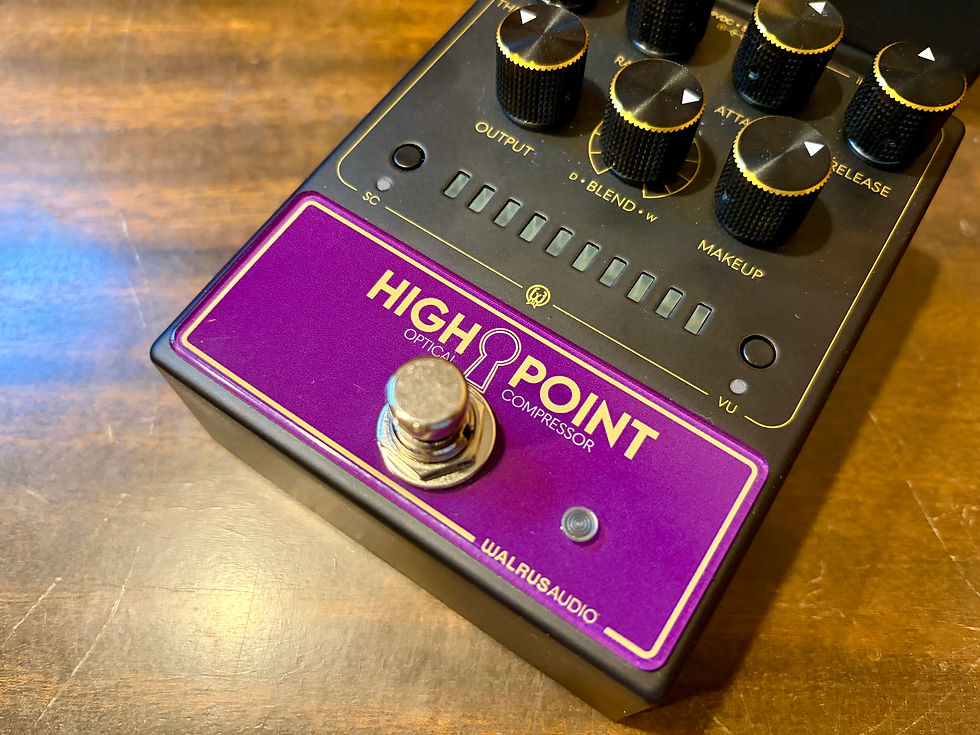
Notice the lit up keyhole. Nice touch. Maybe paying homage to Mira?
The VU metering alone sets this apart from many other compressors on the market. Being able to visually track what the compressor is actually doing is certainly useful for dialing in settings live or in rehearsal. Walrus takes things a bit further with their implementation here though.
The metering functionality of the Highpoint compressor has three different individually selectable monitoring modes. You press the small VU button on the face of the pedal to cycle through the following modes:
• Input level (small LED illuminates Green) - Use this to check if the input signal is healthy.
• Output Level (small LED illuminates Yellow) - Use to monitor output signal and adjust to match input signal level.
• Gain Reduction (small LED illuminates Red) - Offers responsive feedback on how the Highpoint is compressing your signal. One thing to point out. In gain reduction mode the array of LEDs are all red. What Walrus is showing in pictures available online where you see red, yellow and green LEDs in the array is one of the other modes. For most use cases leaving the meter in the Gain Reduction setting is going to be most useful because that's the mode that delivers the real-time feedback of how much compression is happening. But, I can see scenarios where putting the device into Input Level mode can help troubleshoot whether the signal being input into the compressor is strong enough to trigger the kind of response you desire from the controls on the device itself. Or if undesirable distortion is present, the Input Level mode could be used to determine whether an input signal is too strong. This leads to the next unique piece of functionality build it. The VU meter can be tuned to be responsive across a wide variety of input signals, from passive guitars, active guitars, synths, to line level signals. You can change the input signal at boot up. To enter the boot up menu: Step 1. Press and hold the Stomp Switch while powering the unit to enter the menu. Step 2. Cycle through the reference levels by pressing the VU button. • Instrument: -4dBu (Green) • Line: +4dBu (Yellow) • Full Scale: +20dBu (Red) Step 3. Confirm the selection by pressing and holding the Stomp Switch. The Meter LEDs will flash blue and the unit will boot up into normal operation.

I suspect most use cases will mean leaving the pedal in the default Instrument level setting. Instrument level would be used when plugging a guitar or bass directly into the pedal or when running normal pedals into it.
Line mode might make sense for scenarios including mixer sends, after a preamp/modeler or when running other studio gear through it. Full scale is seemingly there for very hot professional signals and maximum headroom metering. Note that headroom is absolutely not an issue in any way shape or form with Highpoint. It will handle anything. What changes practically is meter sensitivity and how easy it is to view gain-staging. It isn't changing how the compressor suddenly becomes "more compressed" because you changed the reference level. But, definitely makes the Walrus Highpoint compressor a more "studio grade" device. Last, but certainly not least is the side chain function. Press the Side chain button to enable a High Pass Filter which delivers an impressively functional way to preserve specific low-end frequencies from engaging the compressor as much as higher frequencies. If you play bass guitar, especially a 5-string bass with low B string, this filter is finely tuned to help prevent the low frequency to overly trigger the compression circuit. It's not that the B string frequencies are not being compressed. They are. It's just that with the filter enabled the compressor is told to respond less to those low notes. I'm sure many of my readers are wondering how the Walrus Highpoint compares to the now discontinued Walrus Mira compressor. Read my review of that one. I definitely liked what Mira had to offer. Both Mira and Highpoint are analog optical compressors designed for smooth, studio-grade compression. Both offer the same controls.
Highpoint definitely leveled up with its impressive metering, input stage adjustments and side chain. I think Highpoint looks a lot better.
But, Highpoint is considerably larger in form factor. The exact size of the die-cast enclosure (with knobs) is 4.78 in (121.6 mm) x Width: 3.62 in (92 mm) x Height: 2.23 in (56.7 mm). The enclosure is clearly designed to follow styling cues set by the recent Walrus Mantle Bass Preamp, but in a portrait format.
My Highpoint arrived to me with two loose knobs. Not a big deal as they just needed to be screwed down tight adjacent the shafts. Otherwise, build quality seems excellent. It's not an overly heavy pedal. It doesn't have that "built like a tank" feel of pedals from the likes of Origin Effects. But it will certainly be road worthy and pedalboard stomp worthy and is robust enough feeling.
One thing I personally don't like about the Highpoint enclosure/user design is the lack of labeling on the knobs.
It could make it tricky for users to recall settings. Having some form of dot labeling would be helpful. Highpoint is overall the more capable of the two. There's also the Walrus Deep Six FET compressor that is still available. That compressor feels, sounds, and responds differently than the Highpoint (and Mira). Read my Deep Six compressor review to learn more about that notable device.
There are plenty of other feature rich compressors on the market that offer as much or even more functionality. The likes of the Becos Stella or Becos Yuna are two fine examples. They are not optical designs but can easily get in the same ballpark. That said, there is a lot to like about the Highpoint.
Anybody using the Walrus Mantle will want Highpoint as a matched set.
The Walrus Highpiont compressor pedal sounds great. It offers a highly versatile circuit design. It's transparent but not at all boring or sterile. It definitely responds and feels a lot like Mira. Other than the form factor I would definitely spring for the Highpoint over Mira.
I would have no issue running Highpoint on my pedalboard on the stage or in studio and would be happy doing so.
It would not be my first choice as a compressor where aggressive compression levels or limiting is a requirement. You should be able to get the Highpoint compressor everywhere now for $349 USD.

The Highpoint compressor should make any guitarist, bassist, or keyboardist perfectly content.
Studio engineers will love it too. Players are given all the control they need to apply useful and unobstrusive compression to their signal. On the other hand, if you’re looking for something simple, this might not be it. That said, once you find the settings that work for you, you might never feel the need to adjust it again. And when you do, a ton of flexibility is at hand. Whenever a new compressor hits the market, especially one from a manufacturer with previous hits on their hand, everyone wants to know if this is "the one". The be all end all of compressor pedals. Let it be known that I hope there never is such a device because that would ruin the fun of ongoing testing and trying new devices.
It isn't perfect but I think the Walrus Highpoint compressor is one of those devices that offers more than enough to make plenty of you out there quite pleased. Pros • Versatility. Can be subtle, transparent, always on, and even venturing into heavy compression/limiting • Plenty of headroom and superb gain staging options • Quality • Excellent LED metering (with multiple settings) • Useful side chain function
• Parallel compression Cons • Size, though there is a lot baked into the pedal. However, there are other compressors out there offering even more functions in smaller form factors. • Price
• Non-labeled knobs could make it tricky for users to recall settings • Requires 500ma power supply. Shouldn't be a deal break for most though. Get it at Sweetwater or Amazon. Retail price: $349


